Thursday, May 26, 2011

Running android on windows

Android 2.2 Froyo released in Google I/O Conference in San Francisco last week. Android Phone users can download the latest version on their phone but if you are not having Android phone then you can try this platform on your computer. Android development site is having the downloadable version of Android 2.2 Froyo SDK. You can download that file and follow the below mentioned steps to run this latest mobile OS from Google on your computer.
How to Run Android 2.2 Froyo on Windows/Mac/Linux
Minimum Requirement to Run Android 2.2
Java Platform(JDK)
Powerful RAM at least 1GB
Min. 2GB Free Space of HD
Android Running on Computer

Follow below steps to get Android 2.2 platform on Computer
1. Download Android SDK
2. Extract the zipped folder and navigate to “Tools” folder inside the extracted folder
3. Open the script named “Android” from the “Tools” folder
4. If you are already having JDK installed on your computer, then you will see a new admin windows. If now having JDK on your computer, then go ahead and install that from here. After installation of JDK, go ahead and click “Android” script
5. Android script will start he SDK manager. Go ahead and navigate to “Available Packages” menu in the left sidebar options
6. There you will see only one link listed. Check that link and then it will start getting package information from repository. If you are getting a message that “Fetch failed because of https” then go to the Settings” option in left panel and check the box which says “Force to use http for https” and then Come back to “Available Packages” and click on that single item available in the list. That will fetch lot many packages from the repository
7. Now go ahead and check four items shown in the picture below. These items are nothing but the Android 2.2 Froyo OS files. After checking the files, go ahead and click on “Install Checked” at bottom of the window

8. Installation of files will take some time. After successful installation, go to “Virtual Devices” option in left panel and click on “New” in that window. Now you are going to add one device in SDK manager. Go ahead and fill up the new form with the same data as mentioned in the picture below, after that click on “Create AVD”.

9. Remember, Adding device may take some time and even may left your system hanged for few minutes. But you will have to have patience in that interval and don’t restart your computer. Once the device will be added in hat list as “A valid Android Virtual device”, you can click on the “Start” button after selecting the newly added device to start the Android Platform on your computer
10. Done! Now you can use the Android platform on your computer to feel the OS from Google. To use Android applications, you will have to get “Eclipse” on your system as well.
You can install Android 2.1 or older versions as well by selecting the packages for that in the step 7 of the steps mentioned above.

Sunday, May 22, 2011

Removing khatra virus

This virus has some symptoms when ever you try to open browser and search remove khatra.exe the browser will automatically close, you can’t not delete khatra.exe or gHost.exe or Xplorer.exe which are created by the same virus as these processes will keep running.

Let’s discuss the removal procedure to delete khatra.exe or gHost.exe or Xplorer.exe virus


Fix:

Follow the procedure below

1. Open Task Manager but if task manager is blocked then unblock task manager and click the process tab, found these process named regsvr.exe(if found there), gHost.exe, khatra.exe and Xplorer.exe, right click on all these process and select end process tree

2. Open Start Menu >> Run, type cmd and click Ok button


3. Now download and install everything search tool

4. Run Everything and type the virus exe names one by one ( khatra.exe, gHost.exe, Xplorer.exe ) and delete all the copies found on your computer anywhere.

5. Now Open start menu >> run, type regedit or if registry editing is blocked then unblock registry editing

6. Press ctrl+f and find the registry keys with names khatra,gHost,Xplorer and delete the values you find with these names.

Friday, May 20, 2011

Editing themes in Nokia S40 Phone

Go the link http://series-60-theme-studio.en.softonic.com/symbian or http://series-40-theme-studio.en.softonic.com/java and download nokia theme studio 2.2 (which is the latest) either s40 or s60 according as your phone model(check that in the same link).
Now install the program,it will be installed as a trail for 14 days.Go to help menu and click on register.You will be asked for product key and serial.You have two options,either go to the web page which is opened in the background as you clicked on register and follow the instructions or use the following serial.
# Nokia Series 40 Theme Studio 2.2 registered on 5 April 2009
Product-Key=EUI4536G-UFMLNFBO-PFKCKWTQ-RN2RE6VG-KW2ST4SI
Username=sabuten2003
Serial-Number=GAWAEFCLJYU6UVQW5GUYTSPW6J3A2H32Z525Y6ICCQFPB32URDSHTPOOZBG7YSMWG5R6KFOFQI

Copy all the above and paste in a text file and save,then in the dialog box for register,you can see something like upload serial text file click on that and show the text file just you saved,thats all!!!
You have got the full version.
In case of any doubts mail me to munsiralikunnath@gmail.com by the subject 'regarding vthreenet blog'.

How To Update Nokia Phone Software

First you shall have to download Nokia phone software updater along with nokia pc suite.For that go to the link http://www.nokia-asia.com/get-support-and-software/download-software/device-software-update/download and download.
Now go to nokia pc suite and click on software updater.Connect your phone via cable and click start.Beware to back up all the data in phone and memory.Now follow the instructions and thus you can have a new software for your phone.
In case of doubts post to munsiralikunnath@gmail.com by subject vthreenet doubts.

Some useful websites related to Computers and Internet

 For Latest softwares Click here
resource hacker:list of a few required resource hacks click here
download resource hacker software from here

For theme patch of XP (for applying any third party themes for XP) dowload theme patcher from here
OR
Download Patched UXtheme.dll File from the above link and replace
from system 32 folder

For a lot of registry edits free of cost ,useful as tweaks or when most Trojans or viruses are affected...try to get rid of virus disturbances by yourself ,either try here or mail to me at munsiralikunnath@gmail.com,I will send you some essential registry keys .

Sunday, May 15, 2011

Criminal complaint against Warne

Rajasthan Cricket Association today (May 15) decided to lodge a criminal complaint against Rajasthan Royals captain Shane Warne at a local court for allegedly abusing its secretary Sanjay Dixit after an IPL match in Jaipur, ignoring the apology from the legendary Australian. The Legal Affairs Committee of RCA today held a meeting and considered the apology letter sent by Royals CEO Sean Morris but was unable to take cognizance in the absence of any details.

Accordingly, the committee decided to file a criminal complaint under IPC sections against Warne and others at the earliest. "It is an aggravated offence and it needs to be dealt with like that. Some kind of disciplinary action is to be taken. I don't know what kind of disciplinary action has been taken. A mere statement was being made and nothing more has been done, just proverbial red-herring," Dixit said.

The ugly incident happened on May 11 when Warne allegedly called Dixit a liar and egoistic after the award ceremony of the IPL tie between Rajasthan Royals and Bangalore Royal Challengers at the Sawai Man Singh stadium in Jaipur. Warne was disappointed with Dixit for not acceding to his request for a favourable pitch for the match and allegedly walked up to Dixit and abused him for not replying to his messages. Royals owner Shilpa Shetty had to intervene and apologise for the incident.

A committee has also been formed consisting of Rajkumar Mathur, Ashok Joshi and Akhilesh Mittal to probe Rajasthan Royals's claim that they got the pitches they wanted so far in the tournament. The committee would go into all aspect of the pitch preparation in the first edition of IPL in which Rajasthan surprised all by winning the title. The legal committee also discussed the matter of Australian commentator Dean Jones who had made some derogatory remarks against the RCA.

The convener of the committee and the vice president of the RCA Rajkumar Mathur said the criminal case would also be filed in this matter under IPC sections and RCA would also go into civil action. "The matter of Dean Jones who stated on a TV channel that 'RCA should lick Shane Warne's feet' was considered and his remarks were taken to be a direct insult to RCA as an institution.

"RCA team is current national champion of the country which is not only the world champion but is also the number one test playing nation. A team of lawyers would examine any other implication of this obnoxious statement and take appropriate action, a criminal complaint under IPC sections and would also go for civil action," he said.

I am not just a Test bowler: Mishra


MUMBAI: Back in the ODI fold for next month's tour of the West Indies, leg-spinner Amit Mishra says he will prove that he is not just a Test bowler.

"I don't know who has said that I'm a Test bowler. I have been bowling in the IPL for the past four years and have been among the leading wicket-takers. I have been performing at all levels. I don't think I'm only a Test bowler," Mishra told reporters in Mumbai.

Mishra till date has played 10 ODIs taking only eight wickets. The Haryana captain is happy to have made a comeback in the national squad for the tour of West Indies after being ignored in the World Cup.

"I always try to give my best at whatever I do. I'm happy that my name is in the team," he said.

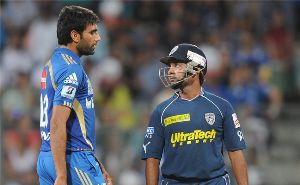
Mishra, who scored a quickfire 18 of just six balls and conceded just 18 runs in his four overs in Deccan Chargers' upset win over Mumbai Indians last night, felt that the last over of his team's innings in which the visitors smacked 23 runs was the turning point of the match.

"Yes I felt that (Munaf's over) was the main point of the match. About 23 runs came of that over. We also bowled and fielded well," he added.

On his altercation with Munaf, he said, "It happens. It's not that it has never happened with me before. It's just that I have never shown my anger on the field but today it got reflected."

Mishra said Australian Cameron White, who is the vice-captain of the squad, was likely to take over once Kumar Sangakkara left for national duty.

"Cameron White is the vice-captain maybe he'll take over once Sangakkara is gone," he added.

The leg-spinner said there was a healthy competition between him and left-arm spinner Pragyan Ojha and this was helping him improve his bowling.

"There is healthy competition between me and Pragyan. We always talk to each other about how to improve ourselves. I feel my bowling has improved because of such competition," he said.